我的书签
 添加书签
 移除书签
Tracing
AgentScope implements OpenTelemetry-based tracing to monitor and debug the execution of agent applications, which features
Provide built-in tracing for LLM, tool, agent, formatter, etc.
Support error and exception tracking
Provide native tracing visualization in AgentScope Studio
Support connecting to third-party platforms like Arize-Phoenix, Langfuse, etc.
Setting Up
Note
Connecting to the AgentScope Studio or third-party tracing endpoint should be done at the beginning of your application by the agentscope.init function.
AgentScope Studio
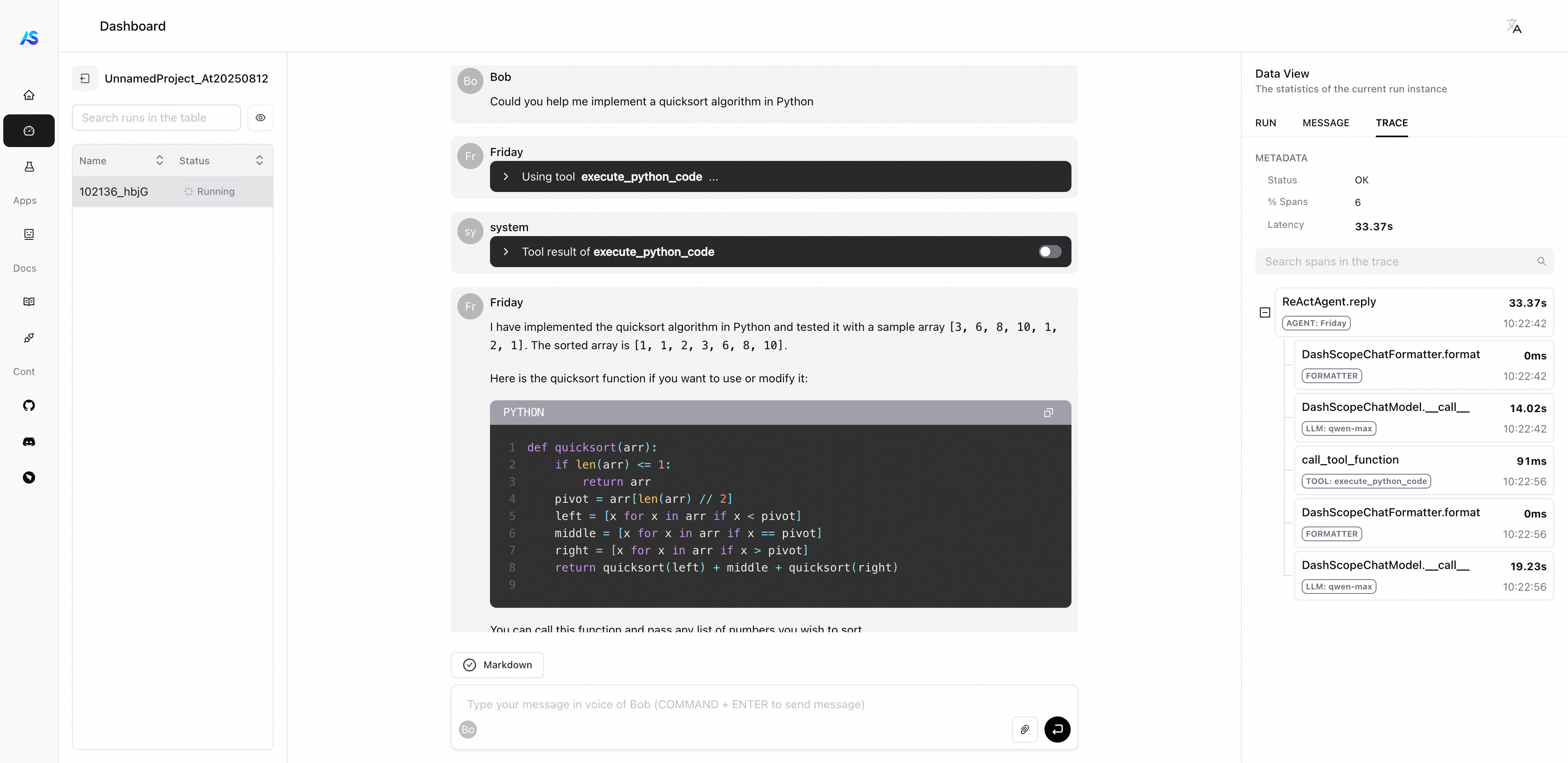
Tracing in AgentScope Studio
When connecting to AgentScope Studio, just provide studio_url parameter in agentscope.init function.
import agentscopeagentscope.init(studio_url="http://xxx:port")
Third-party Platforms
To connect to third-party tracing platforms, set the tracing_url parameter in the agentscope.init function. The tracing_url is the URL of your OpenTelemetry collector or any compatible backend that supports OTLP (OpenTelemetry Protocol).
import agentscope# Connect to OpenTelemetry-compatible backendsagentscope.init(tracing_url="https://your-tracing-backend:port/traces")
Taking Arize-Phoenix and Langfuse as examples:
Arize-Phoenix: You need to set the PHOENIX_API_KEY in your environment variables.
Connect to Arize Phoenix
# Arize Phoenix Integrationimport osPHOENIX_API_KEY = os.environ.get("PHOENIX_API_KEY")os.environ["OTEL_EXPORTER_OTLP_HEADERS"] = f"api_key={PHOENIX_API_KEY}"agentscope.init(tracing_url="https://app.phoenix.arize.com/v1/traces")
LangFuse: You need to set the LANGFUSE_PUBLIC_KEY and LANGFUSE_SECRET_KEY in your environment variables. The authorization header is constructed using these keys.
Connect to LangFuse
import os, base64LANGFUSE_PUBLIC_KEY = os.environ["LANGFUSE_PUBLIC_KEY"]LANGFUSE_SECRET_KEY = os.environ["LANGFUSE_SECRET_KEY"]LANGFUSE_AUTH_STRING = f"{LANGFUSE_PUBLIC_KEY}:{LANGFUSE_SECRET_KEY}"LANGFUSE_AUTH = base64.b64encode(LANGFUSE_AUTH_STRING.encode("utf-8")).decode("ascii")os.environ["OTEL_EXPORTER_OTLP_HEADERS"] = f"Authorization=Basic {LANGFUSE_AUTH}"# EU data regionagentscope.init(tracing_url="https://cloud.langfuse.com/api/public/otel/v1/traces")# US data region# agentscope.init(tracing_url="https://us.cloud.langfuse.com/api/public/otel/v1/traces")
Customizing Tracing
As stated above, the tracing in AgentScope is implemented based on OpenTelemetry. That means your own tracing code implemented by OpenTelemetry sdk is compatible with AgentScope natively.
Besides, AgentScope has built-in the following decorators to trace the corresponding modules:
@trace_llm: Trace the__call__function of classes inherit fromChatModelBase@trace_reply: Trace thereplyfunction of classes inherit fromAgentBase@trace_format: Trace theformatfunction of classes inherit fromFormatterBase@trace: Trace general functions
Tracing LLMs
The @trace_llm decorator is to trace the __call__ function of ChatModelBase classes.
Note
Your LLM class must inherit from ChatModelBase
Tracing new ChatModel class
class ExampleChatModel(ChatModelBase):"""An example Model"""...@trace_llmasync def __call__(self,*args: Any,**kwargs: Any,) -> AsyncGenerator[ChatResponse, None] | ChatResponse:"""LLM call"""...
Tracing Agent
The @trace_reply decorator is for agent implementations and tracing the reply function.
Note
Your agent class must inherit from AgentBase
Tracing new Agent class
class ExampleAgent(AgentBase):"""An example agent class"""@tracer_replyasync def reply(self, *args: Any, **kwargs: Any) -> Msg:"""Reply to the message."""...
Tracing Formatter
The @trace_format decorator is for formatters implementations and tracing the format function.
Note
Your formatter class must inherit from FormatterBase
Tracing new Formatter class
class ExampleFormatter(FormatterBase):"""A simple example formatter class"""@trace_formatasync def format(self, *args: Any, **kwargs: Any) -> list[dict]:"""Example formatting"""
General Tracing
The @trace decorator is different from the above decorators, as it is a general-purpose tracing decorator that can be applied to any function. It requires a name parameter to identify the traced function, and can trace various types of functions, including:
synchronous functions
synchronous generator functions
asynchronous functions
asynchronous generator functions
General tracing example
# 1. Synchronous function@trace(name='simple_function')def simple_function(name: str, age: int) -> str:"""A simple function with automatic tracing."""return f"Hello, {name}! You are {age} years old."# 2. Synchronous generator function@trace(name='number_generator')def number_generator(n: int) -> Generator[int, None, None]:"""Generate numbers from 0 to n-1."""for i in range(n):yield i# 3. Asynchronous function@trace(name='async_function')async def async_function(data: dict) -> dict:"""Process data asynchronously."""return {"processed": data}# 4. Asynchronous generator function@trace(name='async_stream')async def async_stream(n: int) -> AsyncGenerator[str, None]:"""Generate stream of data asynchronously."""for i in range(n):yield f"data_{i}"
Total running time of the script: (0 minutes 0.000 seconds)
Download Jupyter notebook: task_tracing.ipynb
Download Python source code: task_tracing.py