我的书签
 添加书签
 移除书签
Agent
In this tutorial, we first focus on introducing the ReAct agent in AgentScope, then we briefly introduce how to customize your own agent from scratch.
ReAct Agent
In AgentScope, the ReActAgent class integrates various features into a final implementation, including
Feature | Reference |
|---|---|
Support realtime steering | |
Support parallel tool calls | |
Support structured output | |
Support fine-grained MCP control | |
Support agent-controlled tools management (Meta tool) | |
Support self-controlled long-term memory | |
Support automatic state management |
Due to limited space, in this tutorial we only demonstrate the first three features of ReActAgent class, leaving the others to the corresponding sections listed above.
import asyncioimport jsonimport osfrom datetime import datetimeimport timefrom pydantic import BaseModel, Fieldfrom agentscope.agent import ReActAgentfrom agentscope.formatter import DashScopeChatFormatterfrom agentscope.memory import InMemoryMemoryfrom agentscope.message import TextBlock, Msgfrom agentscope.model import DashScopeChatModelfrom agentscope.tool import Toolkit, ToolResponse
Realtime Steering
The realtime steering allows user to interrupt the agent’s reply at any time, which is implemented based on the asyncio cancellation mechanism.
Specifically, when calling the interrupt method of the agent, it will cancel the current reply task, and execute the handle_interrupt method for postprocessing.
Hint
With the feature of supporting streaming tool results in Tool, users can interrupt the tool execution if it takes too long or deviates from user expectations by Ctrl+C in the terminal or calling the interrupt method of the agent in your code.
The interruption logic has been implemented in the AgentBase class as a basic feature, leaving a handle_interrupt method for users to customize the post-processing of interruption as follows:
# code snippet of AgentBaseclass AgentBase:...async def __call__(self, *args: Any, **kwargs: Any) -> Msg:...reply_msg: Msg | None = Nonetry:self._reply_task = asyncio.current_task()reply_msg = await self.reply(*args, **kwargs)except asyncio.CancelledError:# Catch the interruption and handle it by the handle_interrupt methodreply_msg = await self.handle_interrupt(*args, **kwargs)...@abstractmethodasync def handle_interrupt(self, *args: Any, **kwargs: Any) -> Msg:pass
In ReActAgent class, we return a fixed message “I noticed that you have interrupted me. What can I do for you?” as follows:
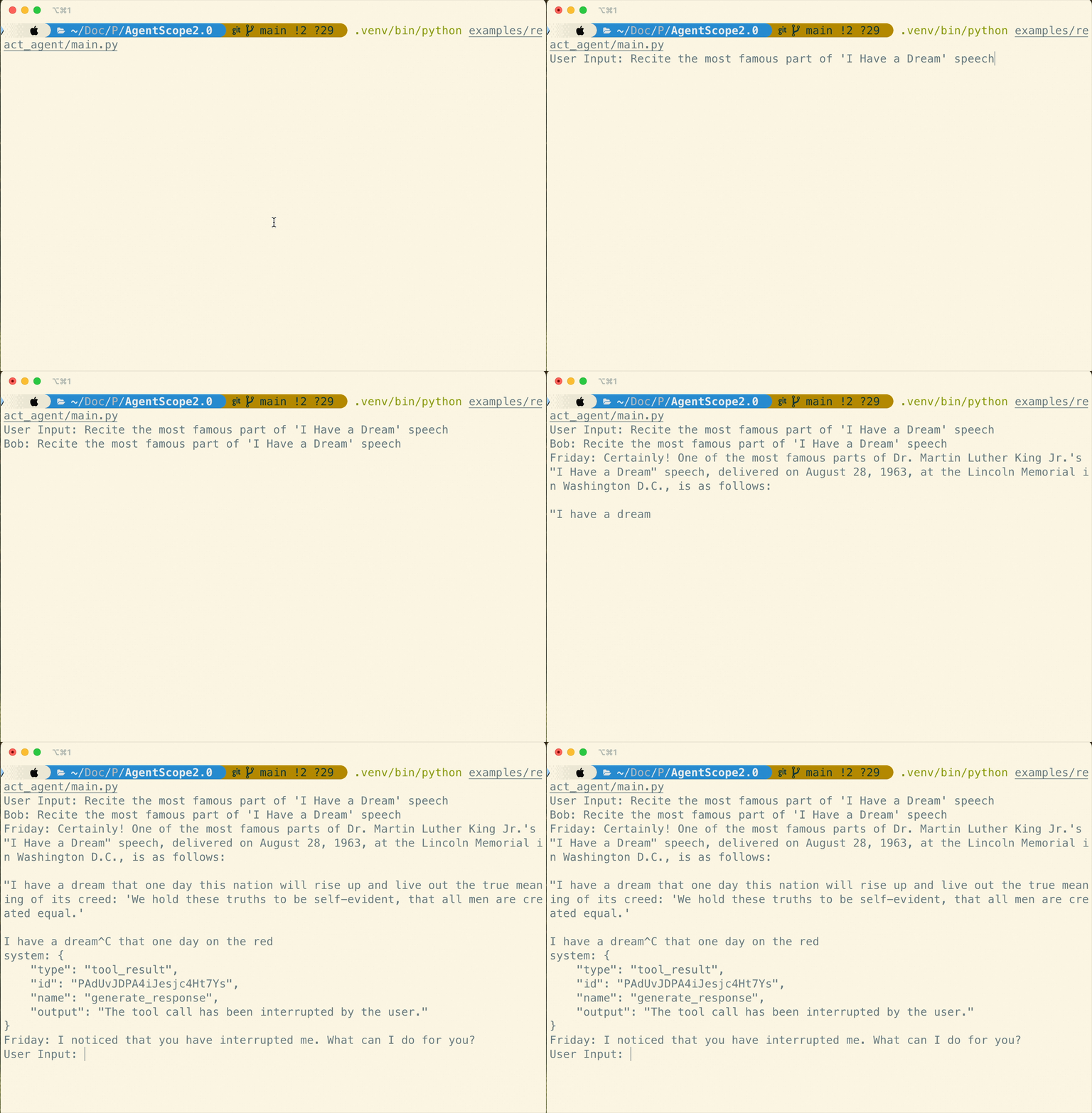
Example of interruption
You can override it with your own implementation, for example, calling the LLM to generate a simple response to the interruption.
Parallel Tool Calls
ReActAgent supports parallel tool calls by providing a parallel_tool_calls argument in its constructor. When multiple tool calls are generated, and parallel_tool_calls is set to True, they will be executed in parallel by the asyncio.gather function.
# prepare a tool functiondef example_tool_function(tag: str) -> ToolResponse:"""A sample example tool function"""start_time = datetime.now().strftime("%H:%M:%S.%f")# Sleep for 3 seconds to simulate a long-running tasktime.sleep(3)end_time = datetime.now().strftime("%H:%M:%S.%f")return ToolResponse(content=[TextBlock(type="text",text=f"Tag {tag} started at {start_time} and ended at {end_time}. ",),],)toolkit = Toolkit()toolkit.register_tool_function(example_tool_function)# Create an ReAct agentagent = ReActAgent(name="Jarvis",sys_prompt="You're a helpful assistant named Jarvis.",model=DashScopeChatModel(model_name="qwen-max",api_key=os.environ["DASHSCOPE_API_KEY"],),memory=InMemoryMemory(),formatter=DashScopeChatFormatter(),toolkit=toolkit,parallel_tool_calls=True,)async def example_parallel_tool_calls() -> None:"""Example of parallel tool calls"""# prompt the agent to generate two tool calls at onceawait agent(Msg("user","Generate two tool calls of the 'example_tool_function' function with tag as 'tag1' and 'tag2' AT ONCE so that they can execute in parallel.","user",),)asyncio.run(example_parallel_tool_calls())
Jarvis: {"type": "tool_use","id": "call_ca51caf9577140efa9914e","name": "example_tool_function","input": {"tag": "tag1"}}system: {"type": "tool_result","id": "call_ca51caf9577140efa9914e","name": "example_tool_function","output": [{"type": "text","text": "Tag tag1 started at 07:46:31.576289 and ended at 07:46:34.579360. "}]}Jarvis: {"type": "tool_use","id": "call_6d3a4aec1bfe464f829738","name": "example_tool_function","input": {"tag": "tag2"}}system: {"type": "tool_result","id": "call_6d3a4aec1bfe464f829738","name": "example_tool_function","output": [{"type": "text","text": "Tag tag2 started at 07:46:37.369972 and ended at 07:46:40.373039. "}]}Jarvis: Both function calls to 'example_tool_function' have been executed in parallel. The first call with tag 'tag1' started at 07:46:31.576289 and ended at 07:46:34.579360, while the second call with tag 'tag2' started at 07:46:37.369972 and ended at 07:46:40.373039.
Structured Output
To generate a structured output, the ReActAgent instance receives a child class of the pydantic.BaseModel as the structured_model argument in its __call__ function. Then we can get the structured output from the metadata field of the returned message.
Taking introducing Einstein as an example:
# Create an ReAct agentagent = ReActAgent(name="Jarvis",sys_prompt="You're a helpful assistant named Jarvis.",model=DashScopeChatModel(model_name="qwen-max",api_key=os.environ["DASHSCOPE_API_KEY"],# Preset the generation kwargs to enable parallel tool callsgenerate_kwargs={"parallel_tool_calls": True,},),memory=InMemoryMemory(),formatter=DashScopeChatFormatter(),toolkit=Toolkit(),parallel_tool_calls=True,)# The structured modelclass Model(BaseModel):name: str = Field(description="The name of the person")description: str = Field(description="A one-sentence description of the person",)age: int = Field(description="The age")honor: list[str] = Field(description="A list of honors of the person")async def example_structured_output() -> None:"""The example structured output"""res = await agent(Msg("user","Introduce Einstein","user",),structured_model=Model,)print("\nThe structured output:")print(json.dumps(res.metadata, indent=4))asyncio.run(example_structured_output())
Jarvis: Albert Einstein was a renowned physicist who developed the theory of relativity, one of the two pillars of modern physics. He is best known for his mass–energy equivalence formula E=mc².The structured output:{"name": "Albert Einstein","description": "A theoretical physicist who is widely regarded as one of the most influential scientists of the 20th century.","age": 76,"honor": ["Nobel Prize in Physics (1921)","Copley Medal (1925)","Max Planck Medal (1929)"]}
Customizing Agent
AgentScope provides two base classes, AgentBase and ReActAgentBase, which differ in the abstract methods they define and the hooks they support. Specifically, the ReActAgentBase extends AgentBase with additional _reasoning and _acting abstract methods, as well as their pre- and post- hooks.
Developers can choose to inherit from either of these base classes based on their needs. We summarize the agent under agentscope.agent module as follows:
Class | Abstract Method | Support Hooks | Description |
|---|---|---|---|
| replyobserveprinthandleinterrupt | pre/postreply pre/postobserve pre/postprint | The base class for all agents, providing the basic interface and hooks. |
| replyobserveprinthandle_interrupt_reasoning_acting | pre/postreply pre/postobserve pre/postprint pre/postreasoning pre/postacting | The abstract class for ReAct agent, extending |
| - | pre/postreply pre/postobserve pre/postprint pre/postreasoning pre/post_acting | An implementation of |
| A special agent that represents the user, used to interact with the agent |
Further Reading
Total running time of the script: (0 minutes 31.818 seconds)
Download Jupyter notebook: task_agent.ipynb
Download Python source code: task_agent.py