我的书签
我的书签
 添加书签
添加书签 移除书签
移除书签- Install Multi-Primary on different networks
- Set the default network for
cluster1 - Configure
cluster1as a primary - Install the east-west gateway in
cluster1 - Expose services in
cluster1 - Set the default network for
cluster2 - Configure cluster2 as a primary
- Install the east-west gateway in
cluster2 - Expose services in
cluster2 - Enable Endpoint Discovery
- Next Steps
- Cleanup
- Set the default network for
Install Multi-Primary on different networks
Follow this guide to install the Istio control plane on both cluster1 and cluster2, making each a primary cluster. Cluster cluster1 is on the network1 network, while cluster2 is on the network2 network. This means there is no direct connectivity between pods across cluster boundaries.
Before proceeding, be sure to complete the steps under before you begin.
If you are testing multicluster setup on kind you can use MetalLB to make use of EXTERNAL-IP for LoadBalancer services.
In this configuration, both cluster1 and cluster2 observe the API Servers in each cluster for endpoints.
Service workloads across cluster boundaries communicate indirectly, via dedicated gateways for east-west traffic. The gateway in each cluster must be reachable from the other cluster.
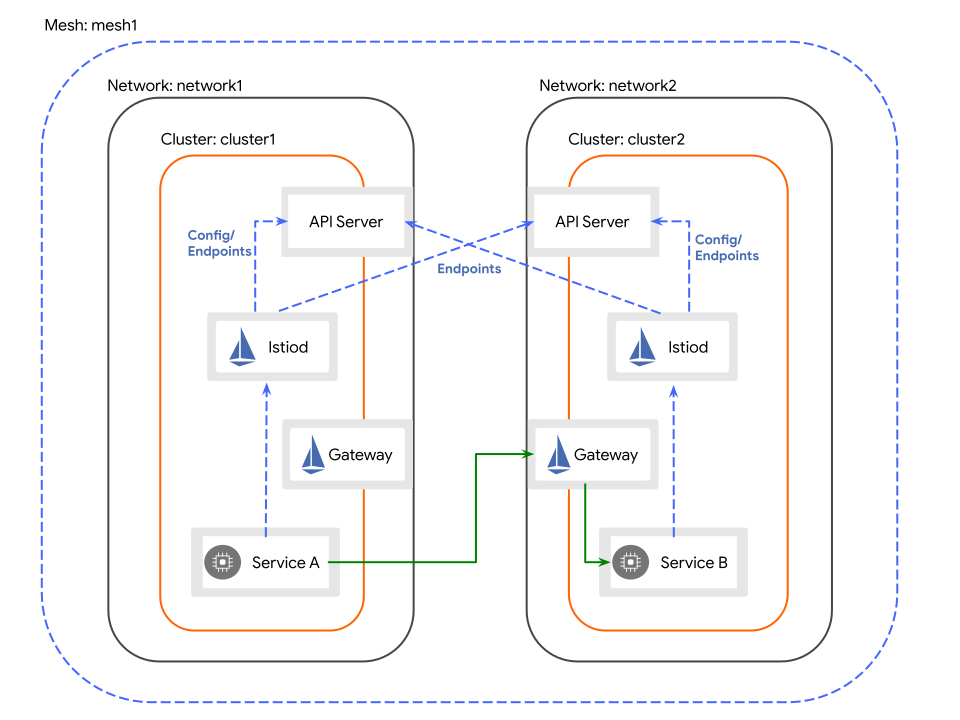
Multiple primary clusters on separate networks
Set the default network for cluster1
If the istio-system namespace is already created, we need to set the cluster’s network there:
$ kubectl --context="${CTX_CLUSTER1}" get namespace istio-system && \kubectl --context="${CTX_CLUSTER1}" label namespace istio-system topology.istio.io/network=network1
Configure cluster1 as a primary
Create the Istio configuration for cluster1:
$ cat <<EOF > cluster1.yamlapiVersion: install.istio.io/v1alpha1kind: IstioOperatorspec:values:global:meshID: mesh1multiCluster:clusterName: cluster1network: network1EOF
Apply the configuration to cluster1:
$ istioctl install --context="${CTX_CLUSTER1}" -f cluster1.yaml
Install the east-west gateway in cluster1
Install a gateway in cluster1 that is dedicated to east-west traffic. By default, this gateway will be public on the Internet. Production systems may require additional access restrictions (e.g. via firewall rules) to prevent external attacks. Check with your cloud vendor to see what options are available.
$ @samples/multicluster/gen-eastwest-gateway.sh@ \--mesh mesh1 --cluster cluster1 --network network1 | \istioctl --context="${CTX_CLUSTER1}" install -y -f -
If the control-plane was installed with a revision, add the --revision rev flag to the gen-eastwest-gateway.sh command.
Wait for the east-west gateway to be assigned an external IP address:
$ kubectl --context="${CTX_CLUSTER1}" get svc istio-eastwestgateway -n istio-systemNAME TYPE CLUSTER-IP EXTERNAL-IP PORT(S) AGEistio-eastwestgateway LoadBalancer 10.80.6.124 34.75.71.237 ... 51s
Expose services in cluster1
Since the clusters are on separate networks, we need to expose all services (*.local) on the east-west gateway in both clusters. While this gateway is public on the Internet, services behind it can only be accessed by services with a trusted mTLS certificate and workload ID, just as if they were on the same network.
$ kubectl --context="${CTX_CLUSTER1}" apply -n istio-system -f \@samples/multicluster/expose-services.yaml@
Set the default network for cluster2
If the istio-system namespace is already created, we need to set the cluster’s network there:
$ kubectl --context="${CTX_CLUSTER2}" get namespace istio-system && \kubectl --context="${CTX_CLUSTER2}" label namespace istio-system topology.istio.io/network=network2
Configure cluster2 as a primary
Create the Istio configuration for cluster2:
$ cat <<EOF > cluster2.yamlapiVersion: install.istio.io/v1alpha1kind: IstioOperatorspec:values:global:meshID: mesh1multiCluster:clusterName: cluster2network: network2EOF
Apply the configuration to cluster2:
$ istioctl install --context="${CTX_CLUSTER2}" -f cluster2.yaml
Install the east-west gateway in cluster2
As we did with cluster1 above, install a gateway in cluster2 that is dedicated to east-west traffic.
$ @samples/multicluster/gen-eastwest-gateway.sh@ \--mesh mesh1 --cluster cluster2 --network network2 | \istioctl --context="${CTX_CLUSTER2}" install -y -f -
Wait for the east-west gateway to be assigned an external IP address:
$ kubectl --context="${CTX_CLUSTER2}" get svc istio-eastwestgateway -n istio-systemNAME TYPE CLUSTER-IP EXTERNAL-IP PORT(S) AGEistio-eastwestgateway LoadBalancer 10.0.12.121 34.122.91.98 ... 51s
Expose services in cluster2
As we did with cluster1 above, expose services via the east-west gateway.
$ kubectl --context="${CTX_CLUSTER2}" apply -n istio-system -f \@samples/multicluster/expose-services.yaml@
Enable Endpoint Discovery
Install a remote secret in cluster2 that provides access to cluster1’s API server.
$ istioctl x create-remote-secret \--context="${CTX_CLUSTER1}" \--name=cluster1 | \kubectl apply -f - --context="${CTX_CLUSTER2}"
Install a remote secret in cluster1 that provides access to cluster2’s API server.
$ istioctl x create-remote-secret \--context="${CTX_CLUSTER2}" \--name=cluster2 | \kubectl apply -f - --context="${CTX_CLUSTER1}"
Congratulations! You successfully installed an Istio mesh across multiple primary clusters on different networks!
Next Steps
You can now verify the installation.
Cleanup
Uninstall Istio in
cluster1:$ istioctl uninstall --context="${CTX_CLUSTER1}" -y --purge$ kubectl delete ns istio-system --context="${CTX_CLUSTER1}"
Uninstall Istio in
cluster2:$ istioctl uninstall --context="${CTX_CLUSTER2}" -y --purge$ kubectl delete ns istio-system --context="${CTX_CLUSTER2}"