我的书签
我的书签
 添加书签
添加书签 移除书签
移除书签Install Multi-Primary
Follow this guide to install the Istio control plane on both cluster1 and cluster2, making each a primary cluster. Both clusters reside on the network1 network, meaning there is direct connectivity between the pods in both clusters.
Before proceeding, be sure to complete the steps under before you begin.
In this configuration, each control plane observes the API Servers in both clusters for endpoints.
Service workloads communicate directly (pod-to-pod) across cluster boundaries.
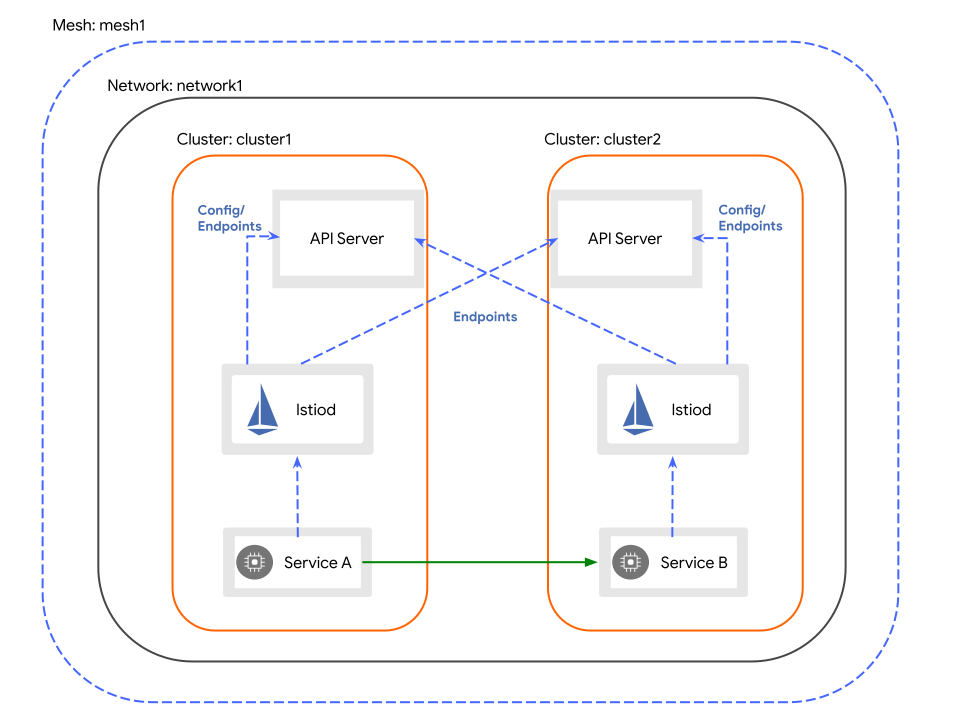
Multiple primary clusters on the same network
Configure cluster1 as a primary
Create the Istio configuration for cluster1:
$ cat <<EOF > cluster1.yamlapiVersion: install.istio.io/v1alpha1kind: IstioOperatorspec:values:global:meshID: mesh1multiCluster:clusterName: cluster1network: network1EOF
Apply the configuration to cluster1:
$ istioctl install --context="${CTX_CLUSTER1}" -f cluster1.yaml
Configure cluster2 as a primary
Create the Istio configuration for cluster2:
$ cat <<EOF > cluster2.yamlapiVersion: install.istio.io/v1alpha1kind: IstioOperatorspec:values:global:meshID: mesh1multiCluster:clusterName: cluster2network: network1EOF
Apply the configuration to cluster2:
$ istioctl install --context="${CTX_CLUSTER2}" -f cluster2.yaml
Enable Endpoint Discovery
Install a remote secret in cluster2 that provides access to cluster1’s API server.
$ istioctl x create-remote-secret \--context="${CTX_CLUSTER1}" \--name=cluster1 | \kubectl apply -f - --context="${CTX_CLUSTER2}"
Install a remote secret in cluster1 that provides access to cluster2’s API server.
$ istioctl x create-remote-secret \--context="${CTX_CLUSTER2}" \--name=cluster2 | \kubectl apply -f - --context="${CTX_CLUSTER1}"
Congratulations! You successfully installed an Istio mesh across multiple primary clusters!
Next Steps
You can now verify the installation.
Cleanup
Uninstall Istio in
cluster1:$ istioctl uninstall --context="${CTX_CLUSTER1}" -y --purge$ kubectl delete ns istio-system --context="${CTX_CLUSTER1}"
Uninstall Istio in
cluster2:$ istioctl uninstall --context="${CTX_CLUSTER2}" -y --purge$ kubectl delete ns istio-system --context="${CTX_CLUSTER2}"